
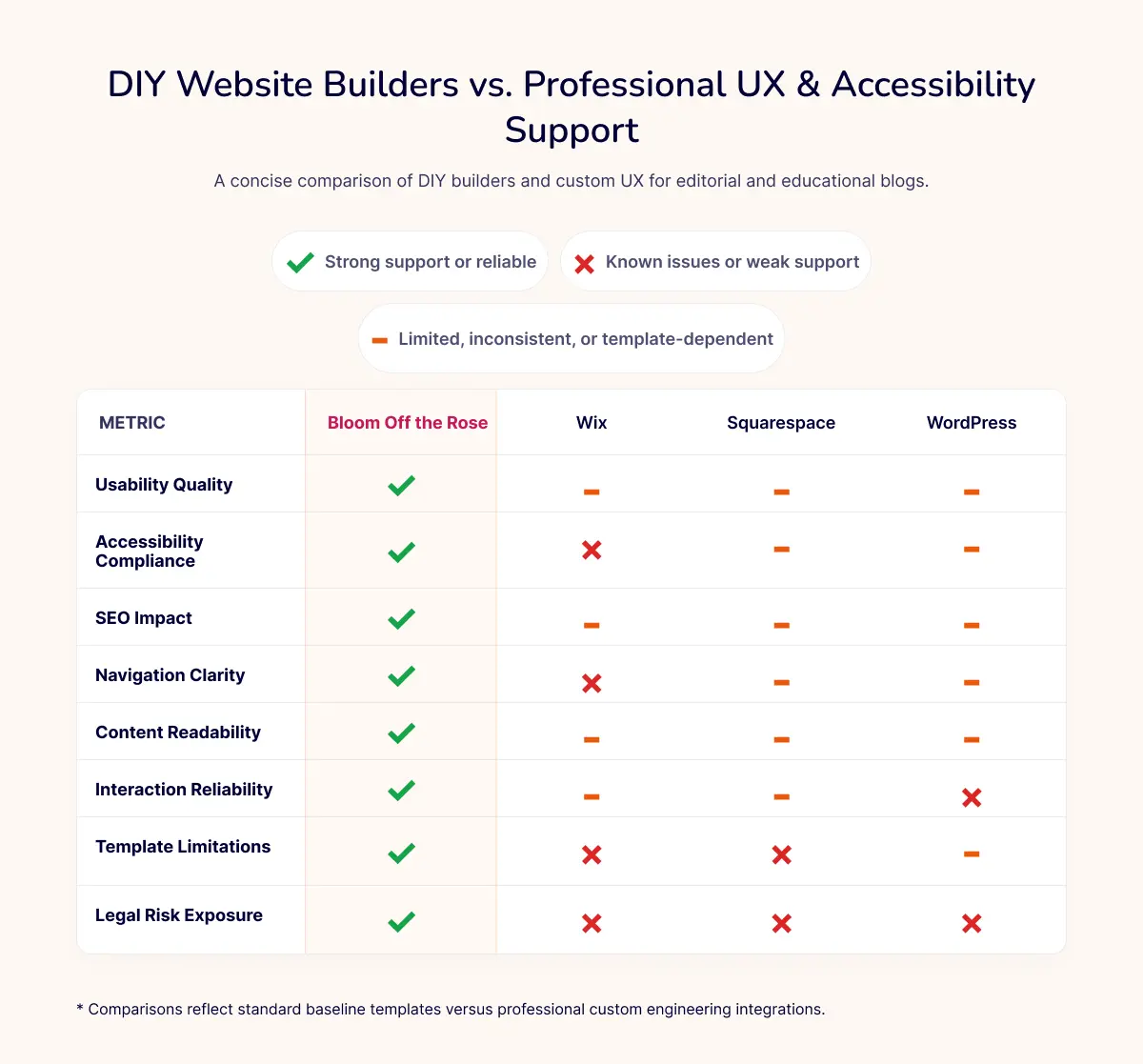
DIY website builders made getting online easier than ever. Here's what they don't tell you about what happens after launch.
For small and mid‑size businesses, DIY website builders like Wix, Squarespace, and WordPress seem like a dream: fast setup, low cost, and no coding required. It's no surprise so many SMBs rely on them to get online quickly.
But here's the part most business owners don't see.
These platforms make it easy to assemble a website, not to build one that is usable, accessible, or effective for real customers. When a website is confusing, frustrating, or impossible for some people to use, the business pays the price through lost sales, lower search visibility, and even legal exposure.
Usability and accessibility aren't "nice‑to‑have" features. They're core business requirements.
The Real Problem with Templates: They Look Polished, But Don't Always Work Well
DIY website builders prioritize speed and visual design. That means templates often look great at first glance but fall short when real customers try to use them.
Common usability problems baked into templates:
- Hard‑to‑read text: Trendy low‑contrast colors may look modern, but they're difficult for many people to read, especially on mobile.
- Confusing navigation: Template menus often follow design trends instead of customer expectations, making it harder for visitors to find what they need.
- Overloaded pages: Templates encourage "filling space," which often leads to cluttered layouts, too much text, and unclear calls to action.
- Slow load times: Large images, animations, and plugin‑heavy designs slow down performance, a major usability and SEO issue.
Common accessibility problems built into templates:
- Missing or incorrect alt text: Templates don't ensure images are described properly, which hurts both accessibility and SEO.
- Keyboard traps and broken interactions: Some template features don't work for people who navigate without a mouse.
- Poor semantic structure: Headings, labels, and page structure often look fine visually but don't make sense to screen readers.
- Plugin conflicts: On WordPress, adding plugins can break interactions, create inconsistent behavior, and introduce new accessibility failures.
These issues aren't random — they're predictable outcomes of template‑driven design. They affect everyone, not just people with disabilities.
Usability Failures Hurt Revenue Just as Much as Accessibility Barriers
Small and mid‑size businesses often underestimate how quickly usability problems drive customers away.
Usability issues cause:
- Higher bounce rates
- Lower conversion rates
- Abandoned carts
- Confusion and frustration
- Lost trust and credibility
If a customer can't find your services, can't read your content, or can't complete a form, they leave and they rarely come back.
Accessibility issues amplify the problem.
The disability community represents hundreds of billions of dollars in spending power. Research shows:
- 69–71% of disabled users leave immediately when they hit a barrier
- 71% spend more with businesses that are accessible
- 53% prefer brands known for accessibility
Key Takeaway
When your website isn't usable or accessible, you're not just losing a few customers. You're losing entire groups of potential buyers.
Poor Usability and Accessibility Directly Damage SEO
Google doesn't rank websites based on how pretty they look. It ranks them based on how well they serve users.
When a site is hard to use, people leave quickly. That hurts:
- Time on page
- Bounce rate
- Pages per session
- Core Web Vitals
- Overall search rankings
The overlap between usability, accessibility, and SEO is huge:
- Clear headings help both screen readers and search engines
- Descriptive alt text improves accessibility and image indexing
- Clean, semantic HTML helps crawlers understand your content
- Faster load times improve user experience and Google's performance metrics
- Logical navigation helps users and improves crawlability
A website that's both usable and accessible performs better across the board.
The Legal Risks Are Real and They Hit SMBs the Hardest
Accessibility isn't just a UX best practice — it's a legal requirement for businesses that serve the public.
Recent data from accessibility litigation reports shows:
- Over 5,000 ADA website lawsuits were filed in 20251
- 2026 is expected to top 6,000 website accessibility lawsuits, making it the highest year on record2
- 64% of defendants were small businesses earning under $25 million1
- Average settlements hover around $30,000, with total costs often reaching $100,000 or more3
- In California, a single accessibility violation can cost a minimum of $4,000 per violation4
For SMBs and mid‑size companies, these numbers are real — not theoretical.
Why SMBs Benefit Most from Professional UX and Accessibility Support
Hiring UX and accessibility experts isn't about making your site "fancier." It's about building a digital foundation that supports your business instead of quietly hurting it.
What you gain:
- Clear, intuitive navigation that helps customers find what they need
- Readable content that works for everyone, on every device
- Accessible interactions that prevent legal risk and expand your audience
- Higher conversions from a smoother, more inclusive user experience
- Lower bounce rates from pages that actually meet user expectations
- Better SEO performance driven by stronger engagement signals
- Reduced legal exposure through proactive accessibility compliance
For small and mid‑size businesses, this isn't optional. It's a strategic advantage.
Final Thoughts
DIY website builders are great for getting online quickly. But they don't protect you from usability problems, accessibility barriers, or legal risk. The hidden costs of a template‑based site can be far greater than the upfront savings.
Investing in UX and accessibility expertise helps you build a website or update your current website that works for everyone.
Sources:
- UsableNet Full Year Accessibility Litigation Report (2025)
- UsableNet Mid-Year Accessibility Litigation Report (2026)
- Seyfarth Shaw LLP ADA Title III Litigation Annual Report (2024 & 2025)
- California Civil Code § 52(a) (Unruh Civil Rights Act)